 Belltime Events Calendar
Recurring events, in full
Every second Tuesday, the last Friday, twelve times, until June. One event with one rule — never 104 posts in your database.
Free WordPress plugin · Pro syncs Google & Outlook
Recurring events, per-event time zones and an iCal feed your visitors can subscribe to — all in the free plugin. Pro pulls your schedule in from Google Calendar, Outlook or any .ics feed, so you stop typing it twice.
Synced 12 minutes ago
Illustration · sample events
How it works
Date, wall-clock time, length and time zone. “19:00 in Copenhagen” stays 19:00 in Copenhagen, in any season.
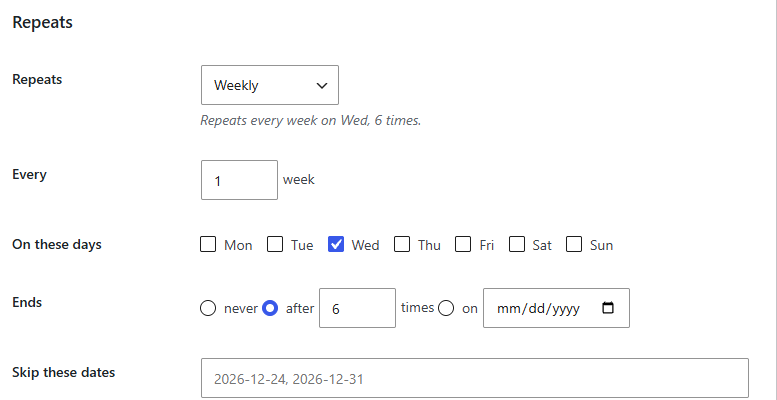
Every Wednesday, six times. The rule is read back to you in plain English as you build it.
Month grid or list, as a block or [belltime_events]. It takes your theme’s fonts and colours.
Free, and complete
The Events Calendar and Sugar Calendar keep recurring events for their paid tier. Here they are free, with no counter, no countdown and no nag screen.
Every second Tuesday, the last Friday, twelve times, until June. One event with one rule — never 104 posts in your database.
Cancel one Tuesday or give one evening its own title. The other fifty-one keep their dates and their links.
Each event keeps its own IANA time zone, so a lecture streamed from Cologne shows the right hour everywhere.
A block, or a shortcode for classic editors and page builders. Both print cleanly and need no JavaScript.
An iCal feed on your own domain, plus add-to-calendar links for Google, Outlook and Apple on every event.
Nothing is hooked globally. Pages without a calendar cost two autoloaded options and not one query.
The real thing
Mark a single date as cancelled, moved or renamed. Visitors see it struck through, and the other fifty-one dates keep their links.
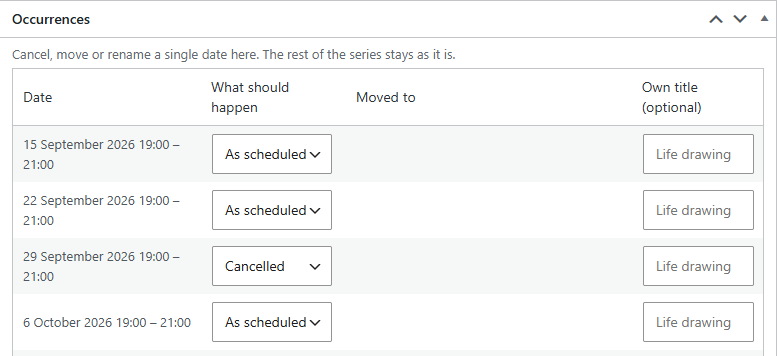 One date, on its own
A lecture streamed from Cologne keeps Cologne’s hour. Each event stores a wall-clock time, a length and its own zone — not a timestamp that drifts at the clock change.
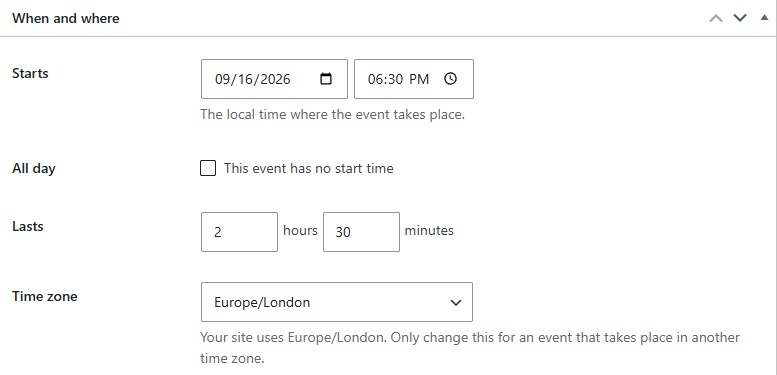 Its own zone
The month grid on a real site, in the theme’s own fonts. The cancelled class is struck through; the guest lecture shows the season it happens in.
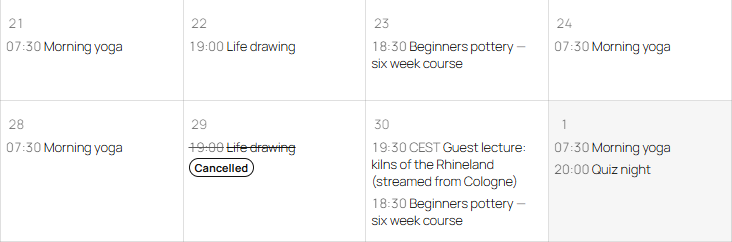 Cancelled, not deleted
The right season
Cancelled, not deleted
The right season
Belltime Pro
Pro subscribes to the calendars you already keep — over their standard .ics address — and keeps the site in step, hourly.
One site per licence · plus VAT where applicable · thirty-day refund · How the sync works
Illustration · a failed feed never empties your calendar
Compare
| Free | Pro | |
|---|---|---|
| Unlimited events, categories and tags | ✓ | ✓ |
| Full recurring events, exceptions, cancelled dates | ✓ | ✓ |
| Per-event time zone, wall-clock time and duration | ✓ | ✓ |
| Month grid, list view, block and shortcode | ✓ | ✓ |
| Outgoing iCal feed and add-to-calendar links | ✓ | ✓ |
| Incoming sync from Google, Outlook, iCloud and any .ics feed | — | ✓ |
| Several feeds, each with its own time zone and category | — | ✓ |
| Visible sync status: last fetched, changed, failed | — | ✓ |
| Updates in your WordPress admin and email support | — | ✓ |
| $0 | — |
FAQ
Complete. A venue with a quiz night every other Tuesday never needs to pay us anything. The one paid part is pulling events in from a calendar you keep elsewhere, because that is the part with ongoing cost.
No. A repeating event is one entry with one rule, and the dates are worked out when the page is drawn. Two years of a weekly class is one row, not 104.
No, deliberately. Ticketing is where event plugins collect their worst bugs and security advisories. This is a calendar, and it stays one.
Your feeds keep syncing, no data disappears, the free plugin runs unchanged, and your site does not stop. What ends is updates and support. The full list is on the pricing page.
Pages without a calendar do no work at all. Pages with one draw it from a short-lived cache that clears when you save an event.
The free plugin makes no outbound requests of any kind. Pro checks its licence at most weekly and for updates at most twice a day, only from admin or a scheduled task. Written out in full here.
Not in the directory yet, so searching your admin for the name will not find it today. Why, and what happens next →
Plugins → Add New, search for Belltime Events Calendar, install, activate. Create your first event and put the block on a page.